| |
[Math+Magic
]™ Lite Edition for Mac OS X
|
MathMagic Lite v10.42 (64-bit)
(for macOS 11 and newer including macOS 26 Tahoe)
Date of Release: April 2, 2026
The last 32-bit version:
MathMagic Lite v9.77 for Mac
(for Mac OS X 10.6 ~ macOS 10.14 Mojave)
Date of Release: November 29, 2022
If you are using macOS X 11 or newer, please use the 64-bit version.
If you are using macOS X 10.14 or older, please use the 32-bit version.
|
Thank you for choosing MathMagic, the ultimate equation editor on the planet!
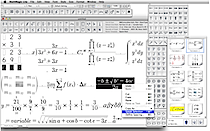
MathMagic Lite is a FREE equation editor.
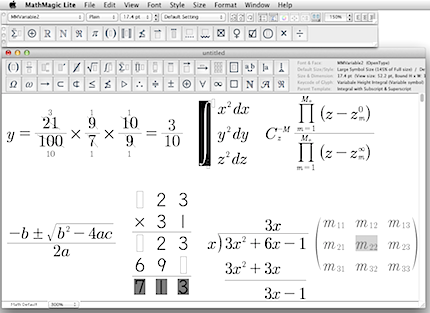
It is a stand-alone application for writing and editing any mathematical expressions and symbols with easy-to-use interface and various powerful features.
MathMagic Lite offers various symbols and templates for elementary ~ high school math and post-secondary math.
MathMagic Lite Edition works well with most word processors like iWork Pages or Mellel, presentation software like Keynote or PowerPoint, graphic software such as PhotoShop, Illustrator, and more,
via Copy and Paste, Drag and Drop, or Exporting in SVG, PNG, JPG and other formats.
This page contains the latest information about MathMagic Lite for macOS X.
|
|
|
|
- Please read the Feature Comparison table to see the difference between "MathMagic Lite" and full featured "MathMagic Personal".
- MathMagic Lite Edition is for personal use only.
MathMagic Lite & included MathMagic fonts should NOT be used for any commercial purpose.
Equations created with MathMagic Lite are not allowed in any commercial material or public contents.
|
|

|
|
- Fixed: When Edit -> "Remember Show Options" turned ON, Show Bounds and other Show ~ options were also applied to the Clip images.
- Fixed: Some units are disabled or removed from several unit popup menus from the Preferences -> Define Spacing dialog to limit the unnecessary unit selections.
- Fixed: MathMagic crashed when multi-lined equations entered in the main box of Large Operator templates or Integral templates.
|
|
- Added: A new field is added to the Define Spacing: Large Op & Integral tab, to make the gap between the Integral symbols adjustable for multiple Integrals including the circled Contour Integrals.
- Added: More Function names and Under-script / Over-script variable names are supported to read out for Speech Text output.
- Fixed: Variable Height Integral symbol was not saved in the correct location when saved in SVG format.
- Fixed: The circle or arrowed circle was not centered on the Contour Integral symbol when saved in SVG format.
|
|
- Added: "Palette Size and Appearance" command added to View menu to support Light mode and Dark mode appearance in high quality vector drawing, together with the original Legacy bitmap mode.
- Added: Palette Size can be set between 50% ~ 400% for the detached floating palettes.
- Added: Palette Size can be set between 100% ~ 200% for the Toolbar palette on top of each editor window.
- Added: Palette Size can be set between 100% ~ 300% for the popup palettes.
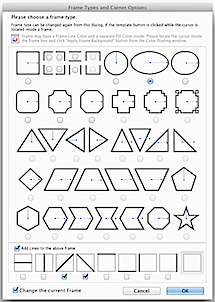
- Added: 5 new quadruple integral templates are added to the Integral palette.
- Added: The gap adjustment for the superscript box and the subscript box of Large Operator templates added to the Define Spacing dialog -> Limit & Large Op pane.
- Added: Equation Info field on top of each editor window displays more information for some templates and symbols.
- Added: More items of accents, integrals, large operator symbols, and some other templates are supported to read out for Speech Text output.
- Changed: Factory default fonts for "Text" style changed from "Times" to "Times New Roman" and and "User-1" style from "Courier" to "Courier New" as those old fonts are no longer available in newer macOS.
- Changed: The drawing of some up/down arrow heads improved.
- Changed: Some default settings are changed for Import/Export Options dialog.
- Fixed: The minimum gap value between the main box and Under-script / Over-script box fixed.
- Fixed: Some other minor UI improved.
|
|
- Changed: Equation Info area on top of each editor window improved.
- Changed: The drawing of some control characters improved.
- Changed: Some interface and messages in the Preferences -> Define Spacing dialog updated.
- Changed: Some palette buttons changed.
- Changed: Some messages and layout of a few dialogs improved or changed.
|
Please read Version History for the details.
|
|
| * System Requirements (64-bit) |
- Intel Macintosh or Apple silicon Macintosh (Universal Binary)
- macOS 11 ~ macOS 26 Tahoe
- About 50 MB of hard disk space for a complete installation
|
| |
| * System Requirements (32-bit) |
- Intel Macintosh
- Mac OS X 10.6 ~ 10.14 Mojave
- About 30 MB of hard disk space for a complete installation
|
| |
| |
|
* What is MathMagic, or [Math+Magic]™
|
MathMagic is an Equation editor for all users ranging from novices, students, teachers, higher education, and to the high-end desktop publishers.
It provides you with very easy user interface and yet powerful features in making equations. You can create every imaginable form of mathematical expressions with MathMagic easily and quickly.
MathMagic is available in a few different configurations:
- MathMagic Pro for Adobe InDesign™ 2.0 ~ CC 2026
- MathMagic Prime Edition for large publishers
- MathMagic Personal Edition for general uses
- MathMagic Lite Edition (Free Equation Editor)
|
Fully functional Trial versions of MathMagic Personal and Pro Editions are available for download at:
http://www.mathmagic.com/download/
|
- Trial version can be switched to a full version when a License Code is entered into the Authorization dialog. There is no separate installer or application for Trial version. One same regular installer and its installed application works as a trial mode if you do not enter a valid License Code.
- MathMagic Lite is Free so no License code required. And no Trial version availabe for MathMagic Lite.
|
|
|
|
For the full Price list, please visit our online store.
For the site licensing or volume order, please contact us at . |
| |
|
|
|
|
* History of Older Versions |
|
|
| |
| |
Terabox Premium Link Generator __top__
Terabox Premium Link Generator — Deep Overview
What it is
A Terabox Premium Link Generator is a tool or service that claims to convert Terabox (a cloud storage service) direct download links into high-speed, premium-quality download links without requiring a paid Terabox account. These generators typically promise features such as resume support, higher bandwidth, bypassing wait times or captchas, and faster downloads via mirrored or proxied servers.
A "TeraBox Premium Link Generator" is a tool or service that claims to allow users to download files from TeraBox at high speeds, without ads, or without needing a premium subscription or the TeraBox app. 🛡️ Reality of Premium Link Generators
Here is why:
Many people look for link generators because they don't want to install the TeraBox client. You can still download via browser:
The era of the premium link generator is effectively over. The technical arms race has been won by the cloud storage providers. Terabox Premium Link Generator
Method 5: The Legitimate Paid Upgrade (The Only 100% Solution)
If you regularly download files larger than 10GB from Terabox, the Terabox Premium (Superuser) plan is actually affordable compared to Google Drive or Dropbox.
Have you tried a Terabox premium link generator recently? Share your experience (or warning) in the comments below to help other users avoid scams. Terabox Premium Link Generator — Deep Overview What
Occasionally, TeraBox partners with platforms like Razer Gold to offer discounted premium keys or redemption codes. 📥 How to Download Without the App
The textures were perfect. The solar panels shimmered like liquid mercury. His render finished at 3:14 AM. He got an A+. 🛡️ Reality of Premium Link Generators Here is |
| |












